AI Halloween Costume Generator - Turn a Photo Into a Look
Turn one clear photo into an original Halloween costume portrait, then animate the look as a short video. Adult-only uploads, consent required, one-time credits.
AI Raindance Video 編集チーム · 2026年10月8日更新
What this page is for
You have a photo. You want a Halloween look that isn't a cheap filter. This page turns one clear portrait into an original costume image, then lets you animate that look as a short video if the still earns it.
The order matters. Image first, video second. A still costs 20 credits. A video costs 100. Spending the small amount to test a direction is the whole point of the workflow.
Use the generator here: AI Halloween Costume Generator.
What an AI Halloween costume generator actually does
It is not a costume shop and it is not a face swap. It is an image editor that keeps the person in your photo recognizable while changing the outfit, the makeup and the scene around them.
You upload a photo, pick a direction, and the system generates a new portrait. The face stays yours. The costume does not exist in a warehouse. It is built from the direction you chose, which is why the results read as designed looks rather than party-store plastic.
Four looks are built into this page as starting points:
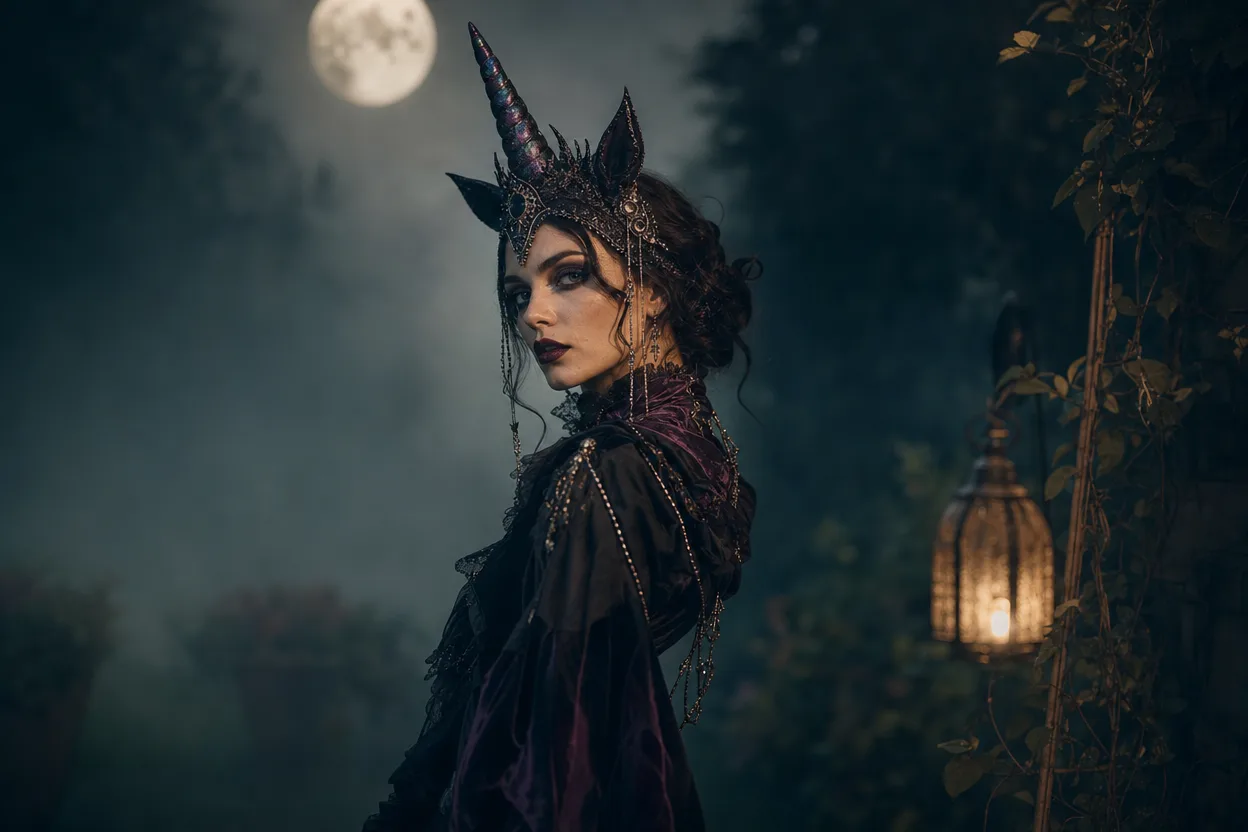
- Haunted Unicorn - pale iridescence, dark florals, a horn that reads as couture rather than cartoon.
- Midnight Braids - deep blues, silver thread, braided hair lit like a night sky.
- Cosmic Princess - nebula fabric, star scatter, a crown that looks forged rather than printed.
- Glam Skeleton - bone makeup done as editorial beauty, not a skull mask.
Each one is an original direction. None of them are licensed character copies, and that is deliberate. See the section below on why.
The five details that make a costume look believable
Most bad AI costume images fail for the same five reasons. Knowing them before you generate saves credits.
1. Fabric behavior. Real costumes drape, bunch at the waist, and catch light on folds. If the generated outfit looks painted onto the body, it reads as fake. Good directions specify material: velvet, tulle, leather, sequin.
2. Makeup continuity. A skeleton look needs the makeup to follow the bone structure of the actual face. If the contour sits in the wrong place, the illusion collapses.
3. Lighting consistency. The light on the costume has to match the light on the face. A candlelit scene with studio-flat skin looks pasted together.
4. Hair and edge detail. Hairline, flyaways, and the edge where hair meets costume are where AI images give themselves away. Sharp source photos help here more than any prompt.
5. Scene grounding. A costume floating in a void looks like a sticker. A costume in a room, a fog, a doorway, or a stage looks like a photograph.
When you pick a direction, ask which of these five it controls. The four built-in looks were written with all five in mind.
Original looks, not borrowed characters
You cannot generate a licensed character here, and the system will not pretend otherwise. Looks are original directions: a concept, a palette, a silhouette, a mood.
That constraint is a feature. Borrowed characters produce images that look like merchandise. Original directions produce images that look like a costume editorial, and they are yours to post without the awkwardness of a trademark in the frame.
If you want a specific franchise costume, this is the wrong tool. If you want a look that reads as "Halloween" and reads as you, this is the right one.
How to go from photo to costume portrait
The photo you upload decides more of the outcome than anything you type.
Choose the right source image. One person, face clearly visible, even lighting, no heavy existing filters, no sunglasses, no hands covering the face. A plain background helps. A group photo does not work - the system needs one clear subject per photo.
Solo versus duet. A solo look takes one photo. A duet takes two separate photos, one per person. Do not upload a single image with two faces and expect a clean duet.
Pick a direction, then adjust. Start with one of the four looks. If the first result is close but the palette is wrong, change the direction rather than stacking contradictory instructions.
Generate the still. This costs 20 credits. Look at the face first, then the costume, then the scene. If the face is not recognizable, stop and try a cleaner source photo before spending more.
Iterate once or twice, not ten times. Two or three stills usually tell you whether a direction works. If it doesn't after that, the source photo is probably the problem.
Only then consider video. The still is the proof. The video is the performance.
Still image first, video second
A video costs 100 credits, five times the still. That ratio is intentional. You should never animate a look you haven't already seen as a still.
The video is an 8-10 second silent MP4. Silent is not a limitation to work around - it is a clean file you can score yourself. Add your own music, a sound effect, or a voiceover in whatever editor you already use. A silent clip drops into any timeline without an audio track fighting yours.
Eight to ten seconds is enough for one strong beat: a turn, a reveal, a walk toward camera. It is not enough for a narrative. Plan the clip around a single moment and it will feel finished. Plan it around a story and it will feel cut off.
The video studio is linked from the same page once your still is ready. Generate the image, review it, then animate.
Credits, routing and what happens when something fails
Credits are sold as one-time packs. There is no subscription, no recurring charge, and nothing to cancel. You buy a pack, you spend it, you decide whether to buy another. Current pack sizes and prices are on the pricing page.
Image generation routes through KIE, with fal, Replicate and WaveSpeed as fallbacks where supported. In practice this means a provider hiccup doesn't automatically kill your job - the request can move to another backend.
Moderation runs twice: before generation and after. SEEAPI handles the checks. The pre-check catches uploads that shouldn't proceed. The post-check catches outputs that shouldn't be delivered. Both are automated and both can stop a job.
If a job fails, credits are returned. You are not charged for a generation that didn't produce a result.
Privacy, consent and the limits of the result
Adults only. Every photo uploaded must be of an adult. No exceptions, no "it's my kid sibling" workarounds.
Consent required. You must have the person's consent to upload their photo and generate a look from it. For duets, that means consent from both people, with two separate photos.
Moderation is not a guarantee. Automated checks reduce risk; they do not eliminate it. Do not upload anything you would not want reviewed.
Results vary. The system keeps the person recognizable, but it is a generative model. Some source photos produce better likeness than others. Flat lighting, motion blur, and heavy existing makeup all reduce fidelity. No one can promise a specific outcome on a specific photo.
Not a likeness license. Generating an image of yourself does not grant rights to anyone else's face, and generating an image of someone else requires their consent regardless of how the file is used afterward.
When this page is the right choice
Use it when:
- You have a clear solo portrait and want a costume look that keeps your face.
- You want an original direction rather than a licensed character.
- You want to test a look cheaply as a still before committing to video.
- You need a short, silent clip you can score yourself.
- You are planning a duet and have two separate photos and consent from both people.
Skip it when:
- Your only photos are group shots or heavily filtered.
- You need a specific franchise costume.
- You need a video longer than ten seconds with built-in audio.
- You want a subscription with recurring credits - this is one-time packs only.
Pre-spend checklist
Run through this before you spend a single credit.
- Photo is of an adult, with their consent.
- One clear face, evenly lit, no sunglasses, no hands over the face.
- Plain or uncluttered background.
- No heavy existing filters or beauty modes on the source.
- For a duet: two separate photos, consent from both people.
- You've picked one direction, not three at once.
- You've budgeted 20 credits for the still before touching video.
- You've read the pricing page and know your pack size.
- You understand the video is 8-10 seconds, silent MP4, and you'll add your own music.
- You know failed jobs return credits, but moderation stops are not failures to argue with.
Ready to test a look? Start with the still: AI Halloween Costume Generator.
FAQ
How many credits does a costume image cost? 20 credits per image look. Video generation is 100 credits. Credits come in one-time packs with no subscription.
Can I upload a photo of two people for a duet? No. Duets use two separate photos, one per person, and both people must be adults who have consented.
What if my generation fails? Credits are returned for failed jobs. Moderation stops are a separate case - those are policy decisions, not technical failures.
Does the video include audio? No. It is an 8-10 second silent MP4. You add your own music or sound in your editor.
Can I generate a specific movie character? No. Looks are original directions, not licensed character copies. You get a designed costume concept, not a franchise replica.