Halloween Pet Photo Editor - Costumes That Keep the Pet
Turn a dog or cat photo into a Halloween pet portrait. Keep breed, fur markings and eye color while changing the costume and set.
Equipo editorial de AI Raindance Video · Actualizado el 8 de octubre de 2026
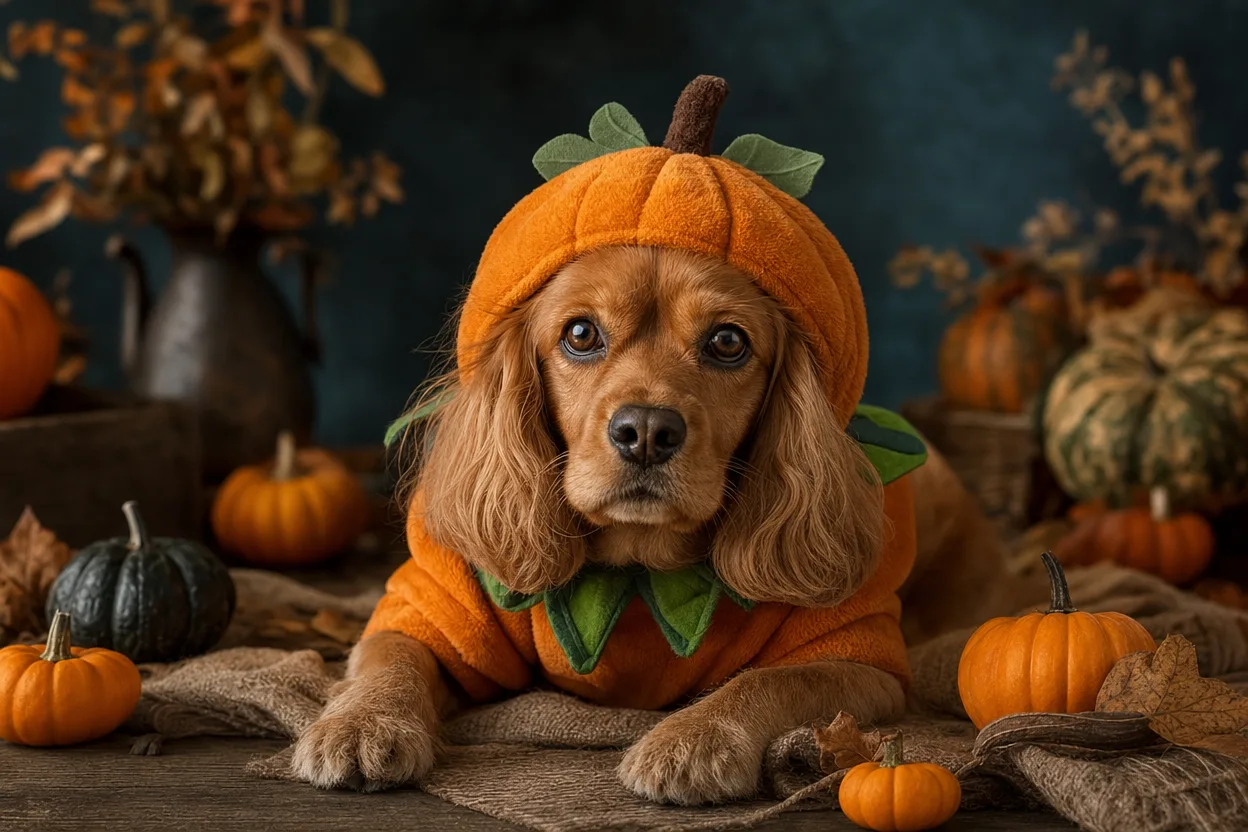
What a Halloween pet portrait actually needs
Most pet costume edits fail for one reason: the model stops looking at your pet and starts looking at "a dog" or "a cat." The costume lands, the set looks seasonal, and the animal underneath is a stranger. Ears are the wrong shape, the blaze on the forehead is gone, the eyes have drifted from amber to brown.
This page is about the opposite approach. You upload a photo, choose a look, and the edit changes the costume and the set while holding onto the things that make your pet recognizable: breed, fur color and markings, eye color, and body shape. That is the whole promise, and it is worth understanding before you spend anything.
Here is the practical version, including what each step costs.
What makes a pet costume edit believable
Believability is not about photorealism. It is about continuity. A viewer who knows your dog should recognize the dog before they notice the pumpkin.
Three things carry that recognition:
Fur pattern. A tuxedo cat's bib, a corgi's white collar, a husky's mask, a labrador's slightly lighter muzzle. These are the details a generic model smooths away first.
Eye color and eye placement. Eyes are where people look. If the color shifts or the spacing changes, the animal reads as "similar pet" rather than "my pet."
Silhouette. Ear set, snout length, chest depth, tail carriage. A dachshund in a costume should still be long. A Persian should still be flat-faced.
Costume and set are the variables. Those three are the constants. Any editor worth using should be judged on how well it protects the constants.
The best photo for a pet edit
The input photo does more work than any setting. A clean source photo will outperform a better prompt every time.
What to look for:
- One pet, clearly the subject. Group shots confuse the framing.
- Face visible and reasonably lit. Avoid heavy backlighting or deep shadow across the eyes.
- Markings unobstructed. No blanket over the back, no harness covering the chest pattern.
- Standing or sitting, not mid-zoom. Motion blur removes the detail the model needs.
- A neutral or simple background. Busy backgrounds get reinterpreted as set dressing.
- Reasonable resolution. A sharp phone photo beats a soft crop from a group picture.
A useful test: if you can describe your pet's distinguishing features from the photo in one sentence, the model can probably see them too. If you can't, neither can the model.
Pet looks that work for Halloween
The available looks are original directions, not licensed character copies. That matters for two reasons: you are not getting a knockoff of a copyrighted design, and the look is built to sit on an animal rather than a human body.
Four that hold up well:
Pumpkin Pet
A carved-pumpkin motif with warm orange light. Works best on pets with strong contrast in their fur, because the orange reads clearly against dark coats and the shadows stay legible on light ones.
Glow Dino Pet
A playful creature-costume direction with a soft glow. Good for pets with expressive faces and short coats, where the costume shape stays readable against the body.
Butter Stick Pet
A whimsical, food-inspired direction. This one is deliberately silly, and it works best when the pet is already in a relaxed pose. A stiff, formal sit fights the joke.
Harvest Crown
A seasonal floral and foliage crown with an autumnal set. The most restrained option, and the safest choice if you want something you could print and frame rather than post as a gag.
Pick based on your pet's coat and posture, not just the concept. A dark cat and a white cat will not get the same result from the same look, and that is expected.
How the pet workflow handles fur and anatomy
Under the hood, the image step routes through KIE, with fal, Replicate, and WaveSpeed as fallbacks where supported. In plain terms: if one provider is unavailable, the job can still complete through another path instead of failing outright.
Moderation runs twice, before and after generation, using SEEAPI. The pre-check screens the uploaded photo; the post-check screens the output. If a job fails, credits are returned.
Costs are simple and worth stating plainly:
- Image look: 20 credits.
- Video generation: 100 credits.
Credits are one-time packs. There is no subscription, so nothing renews in the background and you are not locked into a monthly bill for a seasonal project.
One rule that is not negotiable: photos must be of adults, with consent. That applies to any person in the frame. Pet-only photos avoid the question entirely, which is part of why this workflow is built around them.
Can a pet portrait become a video?
Yes. Once you have an image you like, it can be animated.
The output is an 8-10 second silent MP4. Silent is deliberate: you add your own music, which means you are not stuck with a stock track and you are not paying for audio licensing baked into the file. Drop in something seasonal, something funny, or nothing at all.
Video costs 100 credits, so treat it as the second decision, not the first. Generate the image, look at it honestly, and only animate the ones that actually work. A mediocre still does not improve with motion.
For duets, the input rule is specific: two separate photos, one per subject. Not a single photo with two pets in frame. Separate sources give the model a clean read on each animal, which is exactly what protects the markings and eye color described earlier.
Privacy and pet safety
Two separate concerns, both worth a sentence.
Privacy. Upload only photos you have the right to use. If a person appears, they must be an adult and must consent. Moderation runs before and after generation, and failed jobs return credits, so a rejected upload does not cost you.
Pet safety. This is a photo workflow. No costume is placed on a real animal, nothing is worn, and no handling is involved. If you want a Halloween portrait of a pet who would rather not wear a hat, this is the low-stress route. Keep the real costume, if any, to something the animal tolerates.
A practical checklist before you spend credits
Run through this once. It saves more credits than any prompt tweak.
- One pet, clearly the subject, face visible
- Markings and fur pattern unobstructed
- Eyes sharp and lit, not in shadow
- Background simple enough to be replaced cleanly
- Photo is yours to use; any person in frame is an adult with consent
- Look chosen to suit coat color and posture, not just the concept
- Budget checked: 20 credits per image, 100 per video
- Plan to review the still before animating
- For duets: two separate photos, one per pet
- Music picked out in advance if you are making a video
If you are ready to try it, start here: create your Halloween pet portrait. If you want to see how credit packs work before committing, the details are on the pricing page.
FAQ
How many credits does a pet photo edit cost? 20 credits per image look. Video generation is 100 credits. Credits come in one-time packs with no subscription.
Can I make a video from my pet portrait? Yes. The result is an 8-10 second silent MP4, and you add your own music afterward.
What if I have two pets? Upload two separate photos, one per pet. A single photo with both animals in frame is not the intended input for a duet.
What happens if a generation fails? Credits are returned. Moderation runs before and after generation, so a blocked or failed job does not leave you out of pocket.
Are the looks based on real Halloween characters? No. The looks are original directions, not licensed character copies. That keeps the designs distinct and built for animal proportions rather than human ones.
The short version
Choose a photo where your pet's markings and eyes are unmistakable. Pick a look that suits the coat and the pose. Spend 20 credits on the image, look at it critically, and only then decide whether it earns the 100-credit video. Protect the constants, change the costume, and the portrait will look like your pet in a Halloween scene rather than a stock animal in a pumpkin.