Halloween AI Prompts - Copy-Ready Ideas for Portraits
Copy original Halloween AI prompts for costumes, makeup, couples, pets and video. Each prompt explains what to preserve and what to change.
Equipo editorial de AI Raindance Video · Actualizado el 8 de octubre de 2026
Start with the brief, not the costume
Most Halloween prompts fail for a boring reason: they describe a costume and forget the person. You end up with a stranger in a witch hat. The face is close but not yours, the hair has changed color, and the smile reads like a stock photo.
A Halloween prompt works better as a production brief. It answers five questions in plain language: who is in the frame, what must stay the same, what changes, where the light comes from, and what should not appear. That last one is the most skipped and the most useful. Telling an editor "no text, no extra hands, no costume logos" prevents more problems than any adjective.
The prompts below are written for image editing, so you can paste them into Gemini, another editor, or this site's look workflow. Each one explains what to preserve and what to change, because that is the part you will actually edit when the first result comes back wrong.
If you want the ready-made versions with the look settings already attached, open Halloween AI Prompts and start from there. Everything below is the reasoning behind them.
How to write a Halloween prompt that keeps the person
Preserve before you transform
Put the preservation clause first. "Keep the same face, skin tone, eye color, hairline and expression" does more work than three sentences of costume detail. If you lead with "make her a vampire queen," many editors treat the whole image as raw material and rebuild the face from scratch.
Order matters. Identity first, then wardrobe, then lighting, then exclusions.
Name the light source
"Spooky lighting" is not a direction. "Single warm lamp from the left, deep shadow on the right cheek, cool blue rim from a window behind" is. Halloween looks live or die on contrast, and contrast needs a source. Pick one key light and one accent, then say where they sit.
Keep the costume plausible
A costume that could exist in a costume shop photographs better than one that could only exist in a render. Fabric weight, seams, and how a collar sits on a neck all signal realness. If you ask for "glowing ethereal gown," expect plastic sheen.
Write exclusions in plain words
Add a short negative line at the end: no text, no watermark, no extra fingers, no logo, no blood on skin, no changed eye shape. Editors respond to specific exclusions far better than to "make it good."
Match the prompt to the output type
Image edits and video are different jobs. An image can hold fine detail like lace and glitter. An 8-10 second silent MP4 needs a simple, readable action: a turn, a step, a glance, a candle flicker. If you write a video prompt like an image prompt, you get a slideshow with drift.
Prompt 1: Midnight Braids
Use for: a solo portrait with braided hair, cool light, and a restrained gothic mood.
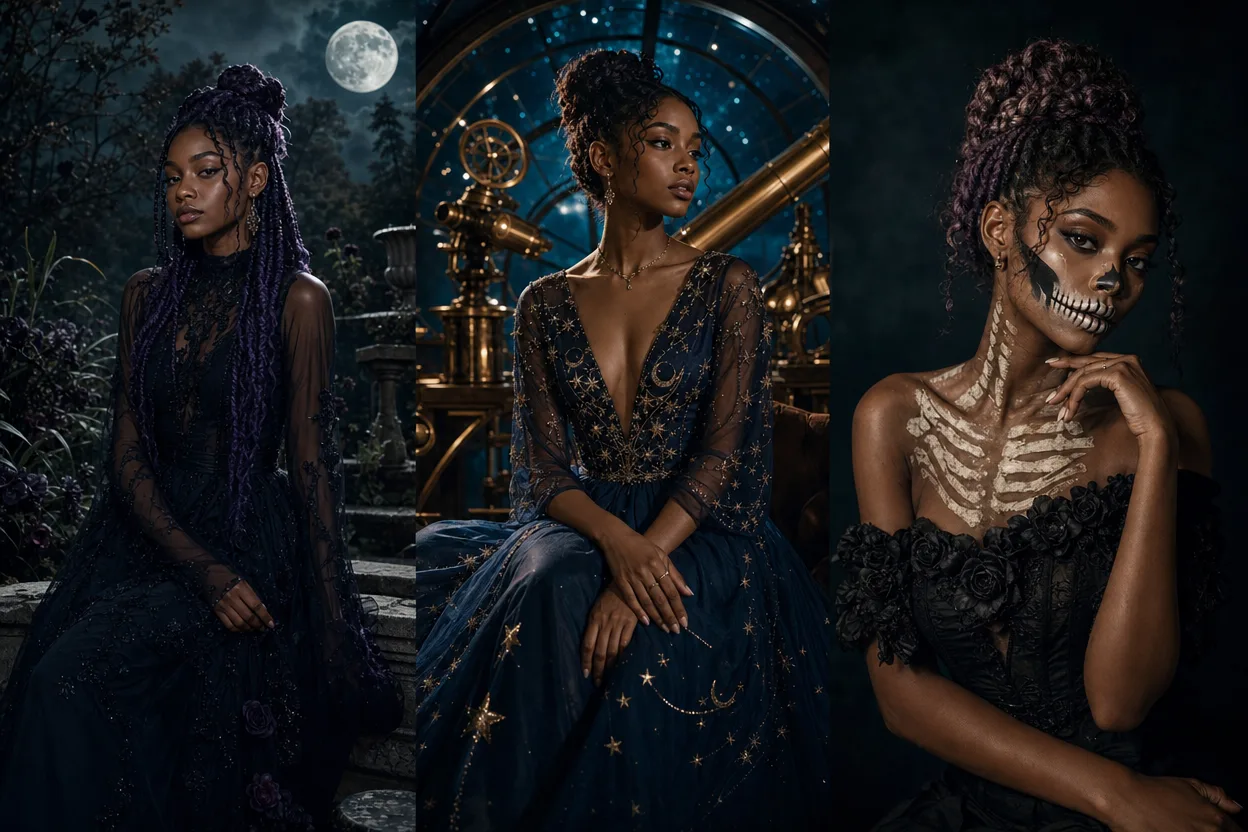
Prompt: Keep the person's face, skin tone, eye color and expression unchanged. Restyle the hair into tight, slightly undone braids with a few loose strands. Wardrobe: deep charcoal knit with a high collar, no visible logos. Lighting: cool moonlight from the upper left, faint warm practical light from below frame. Background: dark textured wall, shallow depth of field. Mood: quiet, not scary. No text, no watermark, no extra hands, no changed eye shape, no blood.
What to preserve: face shape, jawline, the exact expression. Braids are a structural change, so the face has to stay anchored or the result drifts.
What to change: hair, wardrobe, background, light temperature.
Common failure: braids that merge into the scalp, or a hairline that moves up. Add "keep the natural hairline visible" if it happens.
Prompt 2: Cosmic Princess
Use for: a costume portrait with celestial makeup and a starfield backdrop.
Prompt: Preserve the same face, skin tone and eye color. Add celestial makeup: fine silver freckles across the cheekbones, a soft gradient eyeshadow in violet and deep blue, subtle highlighter on the brow bone. Wardrobe: structured bodice with a modest neckline, matte fabric, no plastic shine. Lighting: soft frontal key with a cool blue rim light behind the shoulders. Background: dark sky with a few small stars, not a galaxy collage. No text, no crown logos, no changed nose shape, no heavy smoothing.
What to preserve: bone structure and skin texture. This look tempts editors into beauty-filter territory.
What to change: makeup, wardrobe, backdrop.
Common failure: the makeup reads as a full mask. Ask for "makeup visible at portrait distance, skin texture still readable."
Prompt 3: Glam Skeleton
Use for: half-face skeleton makeup that still looks like a person, not a prop.
Prompt: Keep the same face, skin tone and expression. Apply skeleton makeup to one side of the face only: clean white base, defined black eye socket shape, short vertical teeth lines over the lips that follow the natural lip curve. Leave the other side of the face bare. Wardrobe: simple black top. Lighting: hard directional key from the right, deep shadow on the made-up side. No text, no full-body skeleton, no blood, no changed eye color, no exaggerated cheekbones.
What to preserve: the bare half of the face. That contrast is the whole image.
What to change: makeup on one side, lighting direction.
Common failure: teeth lines that ignore the lips. Specify "teeth lines follow the natural lip line" and check the mouth before spending credits on a video.
Prompt 4: Pumpkin Pet
Use for: a pet portrait with a harvest mood. Note that the site's photo rules cover adults with consent, so keep human faces out of this one and treat it as an animal-only frame.
Prompt: Keep the animal's markings, fur pattern, eye color and ear shape unchanged. Add a small fabric pumpkin-shaped bandana around the neck, matte cotton, no plastic. Lighting: warm late-afternoon sun from the left, soft shadow under the chin. Background: wooden fence and dry grass, blurred. No text, no costume hat, no changed eye color, no human hands in frame.
What to preserve: markings and ear shape. These are the identity anchors for a pet.
What to change: accessory, background, light warmth.
Common failure: the bandana swallows the neck or the fur pattern shifts. Reduce accessory size and re-run.
Prompt 5: Cowboy and Angel couple
Use for: a two-person costume portrait. This requires two separate photos, one per person, submitted as a duet.
Prompt: Preserve both faces, skin tones, eye colors and expressions exactly. Person one: worn leather jacket, plain shirt, wide-brim hat with a matte finish. Person two: soft white layered fabric, simple halo band above the head, no wings filling the frame. Lighting: single warm key from camera left, cool fill from the right, both subjects lit consistently. Background: dusk sky, low horizon. No text, no swapped faces, no extra limbs, no costume logos.
What to preserve: both identities and the relative lighting. Mismatched light between the two people is the giveaway that it was stitched together.
What to change: wardrobe, accessories, backdrop.
Common failure: one face gets more detail than the other. If so, simplify the busier costume and re-run.
Prompt 6: Rain-lit video still
Use for: a still frame designed to become an 8-10 second silent video.
Prompt: Keep the same face and expression. Wardrobe: dark coat with the collar up. Setting: wet street at night, rain visible as thin streaks, warm shop light reflected on the pavement. Lighting: warm key from a window at left, cool streetlight rim from behind. Pose: mid-step, looking slightly off camera. No text, no watermark, no umbrella covering the face, no changed eye color.
What to preserve: the face and the pose simplicity. A video model has seconds, not minutes.
What to change: environment, wardrobe, lighting.
Common failure: too much motion in the still. If the frame is already busy, the video will smear. Keep one clear action: a turn of the head, a step forward, rain falling.
What to change when the result is wrong
Work through this in order. Most fixes are one line, not a rewrite.
- Face drifted: move the preservation clause to the very front and repeat it. Add "same jawline, same nose, same eye spacing."
- Costume looks plastic: add fabric words. Matte cotton, worn leather, brushed wool. Remove "glowing" and "shimmering."
- Lighting is flat: name a direction and a color for each source. One key, one rim.
- Extra fingers or hands: add a negative line and simplify the pose. Hands near the face cause most of these.
- Makeup too heavy: ask for "visible at portrait distance, skin texture readable."
- Video looks like a slideshow: shorten the action to one movement and cut background detail.
Credits, moderation and what happens when a job fails
Be clear about cost before you experiment. An image look costs 20 credits. Video generation costs 100 credits and produces an 8-10 second silent MP4, so you add your own music afterward. Credits are one-time packs with no subscription, which means you can buy a pack for one project and stop. Check pricing before a long session so you know your budget.
Moderation runs before and after generation. Photos must be of adults with consent. Solo looks use one photo; duets use two separate photos. If a job fails, credits are returned, so a failed run costs you time rather than balance.
Image routing runs through KIE with fal, Replicate and WaveSpeed fallbacks where supported, and moderation uses SEEAPI. In practice this means a provider hiccup is less likely to end your session.
One honest note: looks are original directions, not licensed character copies. You will not get an exact film costume, and asking for one is a good way to get a rejected job. Describe the mood and the silhouette instead.
A practical checklist before you spend credits
- Is the preservation clause the first sentence?
- Did you name one key light and one accent light, with directions?
- Is the costume described with fabric and fit, not just color?
- Did you list exclusions in plain words?
- For duets, are there two separate photos of two consenting adults?
- Is the action simple enough for 8-10 seconds of silent video?
- Have you tested the look as a 20-credit image before spending 100 on video?
- Do you have music ready for the MP4?
If you can answer all eight, you are ready. If not, fix the prompt first. It is cheaper than a re-run.
FAQ
Do these prompts work outside this site? Yes. They are written as plain editing instructions, so they paste into Gemini or another editor. Results vary by tool, especially on hair and hands.
Why does the face change even when I ask it not to? Usually because the transformation is described before the preservation. Put identity first, repeat it, and keep the costume change to one or two elements per run.
Can I make a couple image from one photo? No. Duets use two separate photos, one per person, and both people must be adults with consent.
What do I get for 100 credits? An 8-10 second silent MP4. You add your own music. Test the look as an image first, since an image look costs 20 credits.
What happens if moderation rejects my prompt? The job does not complete and credits are returned. Rewrite the prompt with original costume directions rather than a licensed character.
Ready to try one? Start with Halloween AI Prompts, pick a look, and paste the brief. Then check pricing so you know exactly what your session will cost.